

You started a company, not an SEO agency. But here you are, googling "how to do SEO" at 11 PM because you cannot afford to drop $3,000 a month on an agency retainer.
Good news: you can absolutely do SEO yourself. At least in the beginning. Startups have been bootstrapping their way to page one since Google was run out of a garage. The key is knowing what to focus on, what tools to use, and when it is time to hand the reins to a professional.
This startup SEO guide will walk you through everything you need to know to get started with DIY SEO. No fluff, no jargon soup. Just actionable steps you can implement this week.
1. When to DIY vs Hire an Agency
Let us be honest: doing SEO yourself is not always the right move. Here is how to decide.
DIY SEO makes sense when:
You are pre-revenue or in early stages with limited budget. You have time to learn and implement (at least 5-10 hours per week). Your niche is not hyper-competitive. You are targeting local or long-tail keywords. You enjoy learning new skills and can stick with it for 6+ months.
Hire an agency when:
You are in a competitive industry (fintech, SaaS, legal). You need results faster than 6-12 months. Your time is better spent on product or sales. You have budget but not bandwidth. You have tried DIY and hit a plateau.
2. Essential Free SEO Tools for Startups
You do not need expensive software to get started. These free tools will cover 80% of what you need.
Google Search Console (Must-Have)
This is non-negotiable. It shows you exactly how Google sees your site, what keywords you rank for, and any technical issues. Free forever.
Google Analytics 4 (Must-Have)
Track your traffic, see where visitors come from, and measure what content performs best. Also free forever.
Ahrefs Webmaster Tools (Free Version)
Connect your Search Console to get backlink data, keyword rankings, and site health scores. Limited but useful.
Ubersuggest (Free Tier)
Neil Patel's tool offers 3 free searches per day. Great for quick keyword research and competitor analysis.
AnswerThePublic (Free Tier)
Discover what questions people ask about your topic. Perfect for content ideas.
Screaming Frog (Free up to 500 URLs)
Crawl your site to find broken links, missing meta tags, and duplicate content. Essential for technical SEO.
PageSpeed Insights
Google's free tool to check your Core Web Vitals and page speed. Critical for user experience and rankings.
3. Setting Up Google Search Console
This should be the first thing you do. Literally stop reading and do this now if you have not already.
Step 1: Go to search.google.com/search-console
Sign in with your Google account. Click "Add Property."
Step 2: Choose Domain or URL Prefix
Domain verification covers all subdomains and protocols. URL prefix is easier but only covers one version of your site. For most startups, URL prefix is fine.
Step 3: Verify Ownership
The easiest method is HTML tag. Copy the meta tag Google provides and paste it in your site's head section. If you use WordPress, plugins like Yoast make this one-click easy.
Step 4: Submit Your Sitemap
Go to Sitemaps in the left menu. Enter your sitemap URL (usually yoursite.com/sitemap.xml). Click Submit.
Step 5: Wait and Check Back
It takes a few days for data to populate. Check back weekly to monitor impressions, clicks, and any errors Google finds.
4. Setting Up Google Analytics 4
GA4 is different from the old Universal Analytics. Here is how to set it up right.
Step 1: Create a GA4 Property
Go to analytics.google.com. Click Admin, then Create Property. Enter your website name and details.
Step 2: Set Up a Data Stream
Choose "Web" as your platform. Enter your website URL. Enable Enhanced Measurement to automatically track scrolls, outbound clicks, and file downloads.
Step 3: Install the Tracking Code
Copy the Google tag (gtag.js) code. Paste it in the head section of every page on your site. If you use a CMS, there is usually a dedicated field for this in settings.
Step 4: Connect to Search Console
In GA4, go to Admin then Product Links then Search Console Links. This lets you see organic search data directly in Analytics.
Step 5: Set Up Key Events
Define what matters to your business. Form submissions, demo requests, sign-ups. Go to Admin then Events then Create Event to set these up.
5. Basic Keyword Research Process
You do not need to be a keyword wizard. Follow this simple process.
Step 1: Brain Dump Your Topics
What does your startup do? What problems do you solve? What questions do customers ask? Write down 20-30 phrases people might search for.
Step 2: Use Google Autocomplete
Type each phrase into Google and see what suggestions appear. These are real searches people make. Screenshot or write them down.
Step 3: Check "People Also Ask"
Scroll down on any Google results page. The "People Also Ask" box shows related questions. Each one is a potential content idea.
Step 4: Validate with Free Tools
Use Ubersuggest or Ahrefs Free Keyword Generator to check search volume. Focus on keywords with 100-1,000 monthly searches to start. These are achievable.
Step 5: Analyze the Competition
Search your target keywords. Look at who ranks on page one. If it is all massive brands with DR 80+ domains, pick an easier keyword. If you see small sites, forums, or outdated content, that is an opportunity.
Step 6: Map Keywords to Pages
Create a simple spreadsheet. One column for keywords, one for the page that should rank. Never target the same keyword with multiple pages.
6. On-Page SEO Checklist
Before you publish any page, run through this checklist.
Title Tag (Required)
Include your target keyword near the beginning. Keep it under 60 characters. Make it compelling so people click.
Meta Description (Required)
Summarize the page in 150-160 characters. Include your keyword naturally. Add a call to action.
H1 Heading (Required)
One H1 per page. It should include your target keyword. It should match the page's main topic.
Header Hierarchy (Important)
Use H2s for main sections. Use H3s for subsections. Never skip levels (do not go from H1 to H3).
Keyword Usage (Important)
Include your keyword in the first 100 words. Use it naturally throughout the content. Use variations and related terms.
Internal Links (Important)
Link to 2-5 other relevant pages on your site. Use descriptive anchor text. Link from high-authority pages to new content.
Images (Important)
Use descriptive file names (not IMG_001.jpg). Add alt text that describes the image. Compress images for fast loading.
URL Structure (Required)
Keep URLs short and descriptive. Include your target keyword. Use hyphens, not underscores.
7. Technical SEO Basics You Can Handle
Technical SEO sounds scary, but these basics are totally doable.
Mobile-Friendly Design
Google uses mobile-first indexing. Test your site on your phone. Use Google's Mobile-Friendly Test tool. If your site is not responsive, fix that before anything else.
Page Speed
Run your site through PageSpeed Insights. Aim for a score of 70+ on mobile. Common fixes: compress images, enable browser caching, minimize JavaScript.
HTTPS Security
Your site must use HTTPS. Most hosts provide free SSL certificates. If you see "Not Secure" in the browser, fix this immediately.
XML Sitemap
Create a sitemap.xml file. Most CMS platforms generate this automatically. Submit it to Google Search Console.
Robots.txt
This file tells search engines what to crawl. Make sure you are not accidentally blocking important pages. You can view yours at yoursite.com/robots.txt.
Fix Broken Links
Use Screaming Frog or a free broken link checker. 404 errors frustrate users and waste crawl budget. Either fix the link or redirect it.
Canonical Tags
If you have duplicate content, use canonical tags to tell Google which version to index. Most CMS platforms handle this automatically.
8. Content Creation Workflow
Consistency beats perfection. Here is a sustainable workflow for startups.
Week 1: Research and Planning
Pick 4 keywords for the month. Outline each piece of content. Research what competitors have written.
Week 2-3: Writing
Write one piece per week. Aim for 1,500+ words for blog posts. Focus on being genuinely helpful, not just hitting a word count.
Week 4: Optimization and Publishing
Run through your on-page checklist. Add internal links to and from new content. Publish and submit URL to Search Console.
Content Types to Prioritize:
How-to guides that solve specific problems. Comparison posts (Your Tool vs Competitor). FAQ pages for common customer questions. Case studies and results. Glossary pages for your industry terms.
9. Basic Link Building Tactics
Links are hard to get, but these tactics work for startups.
Founder Personal Brand
Get quoted in industry publications. Write guest posts on relevant blogs. Appear on podcasts in your niche. Every mention is a potential link.
Resource Link Building
Create genuinely useful resources (tools, calculators, guides). Find pages that link to similar resources. Reach out and suggest your resource as an addition.
Startup Directories
Submit to Product Hunt, Crunchbase, AngelList. Industry-specific directories in your niche. Local business directories if applicable.
Partner and Integration Links
Do you integrate with other tools? Ask for a link on their integrations page. Do you have partners or vendors? Exchange links where relevant.
Broken Link Building
Find broken links on relevant sites. Create content that could replace the dead resource. Reach out suggesting your content as a replacement.
What Not to Do:
Never buy links. Never participate in link schemes. Never use private blog networks. These tactics will get you penalized.
10. Monthly SEO Maintenance Checklist
Set aside 2-3 hours each month for these tasks.
Search Console Review (30 min)
Check for crawl errors and fix them. Review which queries are driving impressions. Look for pages losing rankings.
Analytics Review (30 min)
Check organic traffic trends. Identify top-performing content. Find pages with high bounce rates.
Content Update (1 hour)
Update one old post with fresh information. Add new internal links to recent content. Fix any broken links found.
Competitor Check (30 min)
What new content are competitors publishing? What keywords are they ranking for that you are not? Any new backlinks you could replicate?
Technical Health (30 min)
Run a quick Screaming Frog crawl. Check Core Web Vitals in Search Console. Ensure sitemap is up to date.
11. When It Is Time to Get Help
DIY SEO has limits. Here are signs you need professional help.
You Have Hit a Plateau
Traffic has flatlined for 3+ months despite consistent effort. You are stuck on page 2-3 and cannot break through. Competitors keep outranking you.
Technical Issues Beyond Your Scope
Site migrations or redesigns. Complex JavaScript rendering issues. Enterprise-level technical debt.
Time is Your Bottleneck
You cannot dedicate 5+ hours weekly. SEO is taking time away from core business activities. You have budget but not bandwidth.
Competitive Pressure
You are entering a market with well-funded competitors. You need results faster than organic can deliver. Your industry requires specialized expertise.
What to Look for in an Agency:
Proven results with startups in your niche. Transparent reporting and communication. No long-term lock-in contracts. Focus on sustainable, white-hat tactics.
12. DIY SEO Timeline Expectations
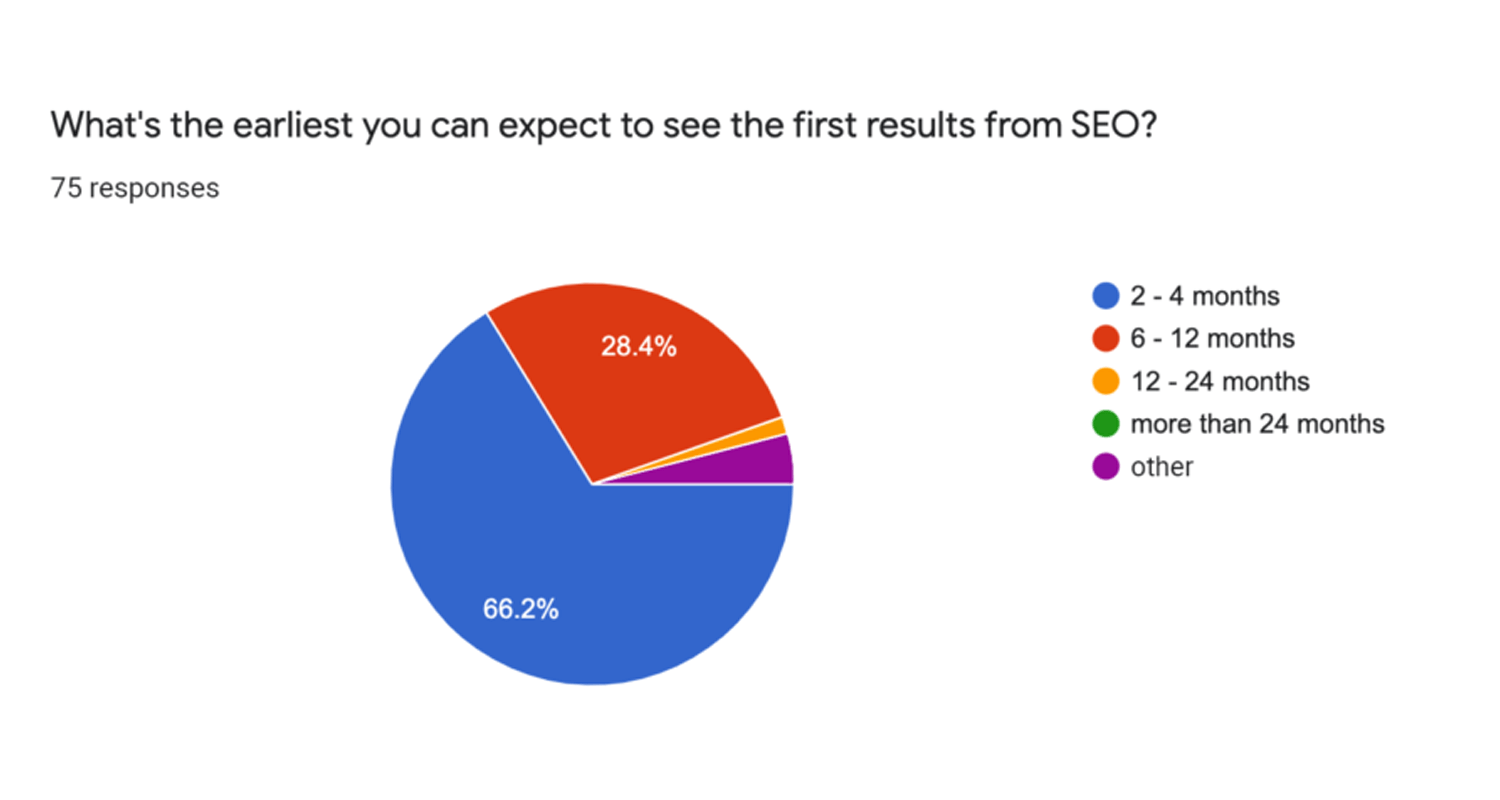
SEO is a marathon, not a sprint. Here is what to realistically expect.
Month 1-2: Foundation
Set up tracking and tools. Fix obvious technical issues. Publish first pieces of optimized content. You might see some impressions start to trickle in.
Month 3-4: Early Signs
Some long-tail keywords start ranking. Traffic begins to grow (slowly). You start understanding what works for your niche.
Month 5-6: Momentum Building
More keywords hitting page 2-3. First backlinks from your outreach efforts. Traffic growth becomes more noticeable.
Month 7-12: Real Results
Some keywords reach page 1. Organic traffic becomes a meaningful channel. You have a content library working for you.
Year 2 and Beyond: Compounding
Past content continues to drive traffic. Your domain authority has grown. New content ranks faster. SEO becomes a primary acquisition channel.
Final Thoughts
DIY SEO is absolutely possible for startups. It takes time, consistency, and a willingness to learn. But the payoff is a sustainable, scalable acquisition channel that does not require constant ad spend.
Start with the basics: set up your tracking, fix technical issues, create quality content targeting achievable keywords, and build links through genuine relationships and value creation.
When you hit the limits of what you can do yourself, or when your time becomes too valuable to spend on SEO, that is when bringing in professionals makes sense.
Until then, bootstrap away. The organic traffic you build now will pay dividends for years to come.